
INSTRUCTIONAL PLAN
Teachers With Vision
CONSTRUCTIVISM
The 10E Standard Model
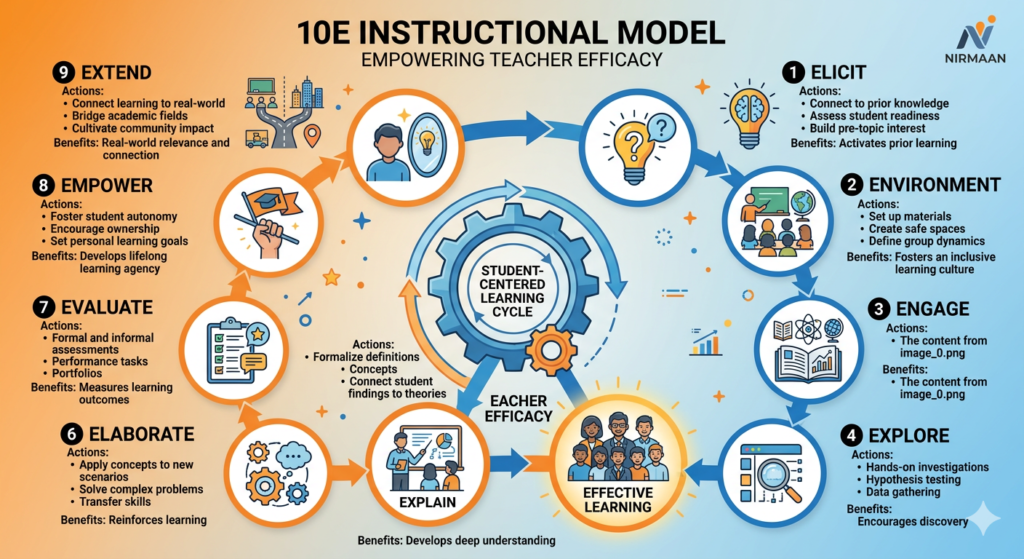
10E is exist While there is no universally standard “10E” model in traditional academic literature (most pedagogical frameworks stop at
7E or 9E), the 10E Instructional Model is used by some modern educators and instructional designers to create the most exhaustive learning cycle possible.
It adds a tenth phase, EQUITY (or E-Inclusion), to ensure the lesson is accessible to all learners, regardless of their background or abilities.
The 10E Lesson Plan Phases
This model is especially relevant under NEP 2020 for its focus on inclusive and holistic education.
- Elicit: Determine what students already know through diagnostic activities.
- Engage: Capture student interest with a “hook” or real-world problem.
- Explore: Hands-on investigation where students discover patterns and data.
- Explain: Formal introduction of terms, definitions, and concepts by the teacher.
- Elaborate: Applying the concept to a similar, practical situation.
- Exchange: Collaborative peer-to-peer sharing and critique of findings.
- Extend: Transferring the knowledge to a completely different field or context.
- Environment: Connecting the lesson to local community issues or global impact.
- Equity (The 10th E): New Phase. Ensuring the lesson incorporates Universal Design for Learning (UDL) to support students with diverse learning needs (e.g., multilingual support, visual aids).
- Evaluate: Holistic assessment of both student mastery and the learning process.
10E Application: Force and Pressure (Physics)
- Equity Phase Integration: Provide a multilingual glossary of terms (Force, Area, Pressure) and ensure physical experiments (like the “Sand Impression” test) are accessible to students with physical disabilities by using digital simulations as an alternative.
To scale your NIRMAAN software to the 10E model, you are moving into the most advanced framework for lesson planning. This model, often used in high-level pedagogical research, ensures that the lesson is not just a one-time event, but a continuous cycle of improvement and community impact.
Here is the 10E Instructional Model designed for your software’s database:
The 10E Instructional Model Breakdown
Phase | Name | Software Function / Goal |
1 | Elicit | Diagnostic: Uncover prior knowledge and specific misconceptions. |
2 | Environment | Preparation: Plan the physical setup, digital tools, and emotional “climate.” |
3 | Engage | Hook: Use a mystery or problem to spark immediate interest. |
4 | Explore | Inquiry: Students investigate through hands-on activities. |
5 | Explain | Codify: Students present findings; teacher provides formal terminology. |
6 | Elaborate | Expansion: Apply the concept to a similar context. |
7 | Extend | Transfer: Apply knowledge to a completely different subject or real-world issue. |
8 | Evaluate | Assessment: Check for mastery using rubrics and various tools. |
9 | Empower | Agency: Students use their knowledge to take action or help others. |
10 | E-Reflect | (The 10th E): Both teacher and student analyze how they learned and what to change. |
Why the 10th “E” (E-Reflect) is Crucial for NIRMAAN
Since your software focuses on the “Teaching Efficacy of B.Ed. Student Teachers” (as seen in your image), the Reflect phase is the most important for their professional growth. It moves them from “delivering a lesson” to “analyzing their impact.”
10E Lesson Plan Example: 8th Std History – The Revolt of 1857
- … (Standard 8Es) …
- Empower:Students create a “Peace and Diplomacy” chart for their school, showing how modern conflicts can be solved through negotiation rather than revolt.
- E-Reflect:The student teacher writes: “Did the ‘Explore’ activity take too long? Did the students understand the map work? What will I change tomorrow?”
Software Interface Suggestion
To match the “Multidisciplinary” and “Constructivist” theme in your banner:
- Visual Update:Change the central “6” in your graphic to a “10”.
- The Web:In your current image, the nodes are connected by thin lines. For 10E, you can make these lines thicker or glowing to show how “Reflect” and “Empower” strengthen the entire lesson.
- Reflection Tab:Add a dedicated “Reflect” tab where student teachers can record voice notes or text about their teaching experience after the class is over
To help you adapt your NIRMAAN software from the 6E model shown in your image to a more comprehensive 10E model, here is a specialized Biology (Science) lesson plan for 8th Standard: The Human Heart.
This 10E structure is designed to improve the “Teaching Efficacy” of B.Ed. student teachers by covering every aspect of a constructivist classroom.
10E Lesson Plan: The Human Heart (Structure & Function)
Subject: Bio-Science | Grade: 8th Std | Time: 45-60 mins
- Elicit (Prior Knowledge)
- Activity:Ask students to place two fingers on their wrist or neck.
- Question:“What do you feel? Is it a muscle moving, or just liquid flowing? Where is it coming from?”
- Goal:Surface their existing ideas about pulse and the heart’s location.
- Environment (Readiness)
- Set-up:Organize the classroom into “Chambers.” Arrange desks into four groups representing the Right/Left Atria and Ventricles.
- Materials:Red and blue colored ribbons or cards for every student.
- Goal:Create a physical “map” of the heart for kinesthetic learning.
- Engage (The Hook)
- Activity:Show a 30-second video of a high-speed car engine vs. a beating heart.
- Question:“An engine stops when it runs out of fuel. Your heart beats 100,000 times a day without stopping for 80+ years. What makes it so powerful?”
- Goal:Spark curiosity about the heart as a “biological pump.”
- Explore (Inquiry)
- Activity:Give each group a model or a diagram of the heart.
- Task:Use “pathway arrows” to trace how blood moves. Identify where the walls are thickest and where they are thinnest.
- Goal:Students discover that the left ventricle is thicker because it pumps to the whole body.
- Explain (Codify)
- Activity:Use the students in the “Chambers” created in Phase 2.
- Teacher Role:Introduce formal terms: Atrium, Ventricle, Aorta, Pulmonary Vein. Explain the difference between Oxygenated (Red) and Deoxygenated (Blue)
- Elaborate (Expansion)
- Activity:The “Valve Challenge.”
- Question:“Why doesn’t the blood flow backward when the heart squeezes?”
- Task:Students look at a diagram of valves and compare them to a one-way door or a bicycle pump valve.
- Extend (Transfer)
- Activity:Multidisciplinary Link (Physics/Math).
- Problem:“If a heart pumps 70ml of blood per beat, and beats 72 times a minute, how much blood does it pump in an hour? How does this pressure compare to a kitchen tap?”
- Goal:Apply biology to mathematical calculations and physical pressure concepts.
- Evaluate (Assessment)
- Activity:“Label the Path.”
- Task:Provide an unlabeled diagram. Students must color it correctly (red/blue) and draw the flow of a single drop of blood from the lungs to the toe.
- Goal:Check for mastery of the circulatory path.
- Empower (Agency)
- Activity:“Healthy Heart Advocacy.”
- Task:Students design a 1-day “Heart-Healthy Menu” and a 15-minute exercise routine to share with their families.
- Goal:Use scientific knowledge to make a positive impact on personal and community health.
- E-Reflect (Metacognition)
- Student Reflection:“What was the hardest part of the heart’s path to remember?”
- Teacher Reflection (For B.Ed. Students):“Did the ‘Chamber’ activity help, or was it too chaotic? How can I better explain the role of valves next time?”
Implementation for NIRMAAN Software:
In your software’s interface, you can now add a “Pathways” feature. When a student teacher selects “Science – Biology,” the software can suggest specific “Environment” setups like the one used here.